
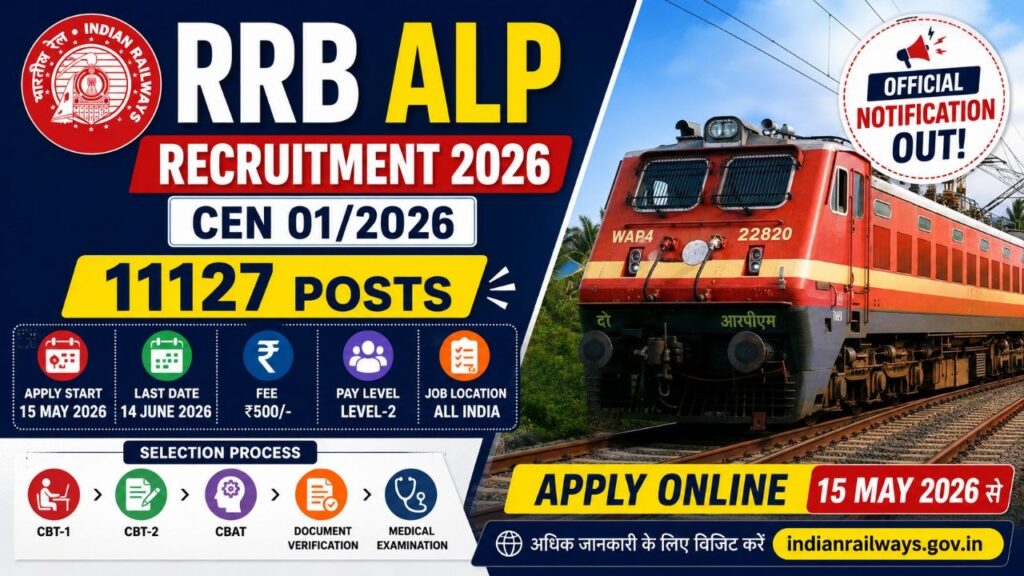
RRB ALP Recruitment 2026 Notification Out for 11127 Posts | CEN 01/2026 Apply Online
रेलवे भर्ती बोर्ड (RRB) द्वारा Assistant Loco Pilot (ALP) भर्ती CEN 01/2026 का ऑफिशियल नोटिफिकेशन जारी कर दिया गया है। इस भर्ती के तहत कुल 11127 पदों पर भर्ती की जाएगी। इच्छुक अभ्यर्थी 15 मई 2026 से ऑनलाइन आवेदन कर सकते हैं। भर्ती से संबंधित आवेदन तिथि, योग्यता, आयु सीमा, आवेदन शुल्क, चयन प्रक्रिया, CBT Exam Pattern एवं Zone Wise Vacancy की पूरी जानकारी नीचे दी गई है।
RRB ALP Recruitment 2026 Overview
RRB ALP Recruitment 2026 Particulars Details
- Recruitment Board :Railway Recruitment Board (RRB)
- Post Name- Assistant Loco Pilot (ALP)
- CEN Number -CEN 01/2026
- Total Posts -11127
- Application Mode- Online
- Job Location -All India
- Basic Salary – Rs. 19,900/-
- Official Website indianrailways.gov.in
RRB ALP Recruitment 2026 Important Dates
- Notification Release Date 21 March 2026
- Apply Online Start 15 May 2026
- Last Date to Apply 14 June 2026
- Last Date Fee Payment 16 June 2026
- Correction Window 17 June to 26 June 2026
- Exam Date Notify Later
Application Fee
- General / OBC / EWS Rs. 500/-
- SC / ST / Female / Ex-Serviceman / Minorities / EBC Rs. 250/-
- Note: CBT-1 परीक्षा में उपस्थित होने पर नियमानुसार फीस रिफंड दी जाएगी।
Age Limit (As on 01 July 2026)
- Minimum Age 18 Years
- Maximum Age 30 Years
Age Relaxation
- OBC 3 Years
- SC / ST 5 Years
Educational Qualification
अभ्यर्थी के पास निम्न में से कोई एक योग्यता होनी चाहिए:
- 10th Pass + ITI
- 10th + Act Apprenticeship
- Diploma in Engineering
- Accepted Trades- Electrician,Fitter,Electronics Mechanic,Wireman,Mechanic Diesel,Turner,Instrument Mechanic,Refrigeration & AC Mechanic आदि।
–
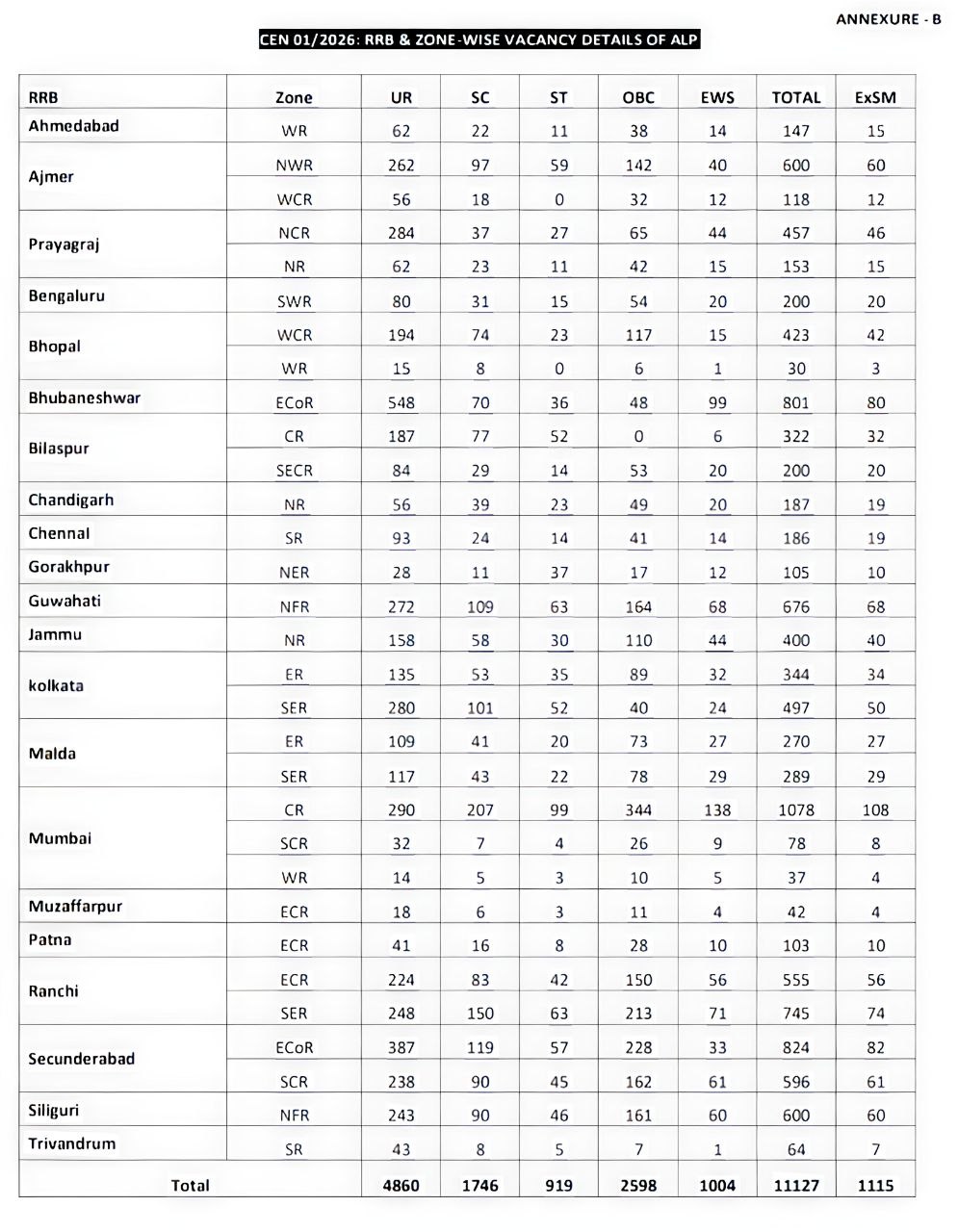
RRB ALP 2026 Vacancy Details
- UR 4860
- OBC 2598
- SC 1746
- ST 919
- EWS 1004
- Total 11127
Selection Process
RRB ALP भर्ती 2026 चयन प्रक्रिया में निम्न चरण शामिल होंगे:
- 1. CBT-1
- 2. CBT-2
- 3. CBAT (Aptitude Test)
- 4. Document Verification
- 5. Medical Examination
RRB ALP CBT-1 Exam Pattern
Subject Questions
- Mathematics 20
- General Intelligence & Reasoning 25
- General Science 20
- General Awareness 10
- Total 75
| Duration | 60 Minutes | | Negative Marking | 1/3 |
RRB ALP CBT-2 Exam Pattern
Part-A
Subject Questions
- Mathematics 25
- Reasoning 25
- General Science 40
- General Awareness 10
- Total 100
Part-B
- Trade Related Questions
- Qualifying Nature
- Minimum Qualifying Marks: 35%
Required Documents
- Passport Size Photo
- Signature
- Aadhaar Card
- 10th Marksheet
- ITI/Diploma Certificate
- Category Certificate
How To Apply RRB ALP Recruitment 2026
- 1. RRB की ऑफिशियल वेबसाइट पर जाएं। Click Here
- 2. ALP Recruitment CEN 01/2026 लिंक खोलें।
- 3. Registration करें।
- 4. आवेदन फॉर्म भरें।
- 5. दस्तावेज अपलोड करें।
- 6. आवेदन शुल्क जमा करें।
- 7. Final Submit करके प्रिंट निकाल लें।
Important Links
- Official Notification PDF Click Here
- Apply Online Active on 15 May 2026
- Official Website Visit Here
RRB ALP Recruitment 2026 CEN No. 01/2026 (ALP) FREQUENTLY ASKED QUESTIONS
Q.1 What is the opening date of online application?
Ans. The opening date of online application is 15-05-2026.
Q.2 What is the closing date of online application?
Ans. The closing date of online application is 14-06-2026 (23.59 hrs.)
Q.3 What is the last date for application fee payment for the submitted application?
Ans. Last date for application fee payment for the submitted applications is 16-06-2026 (23.59 hrs.)
Q.4 What are the dates for Modification of application?
Ans.Modification window will be open only after closing date for fee payment for the submitted applications. Modification window will be active from 17-06-2026 to 26-06-2026 (23.59 hrs.). If, a candidate wishes to modify, change or correct any details they may do so by paying a modification fee of Rs.250/- (non- refundable) for each occasion. However, Details filled in ‘Create an Account’ form (including mobile number and Email ID) and Chosen RRB cannot be changed.
Q.5 Are PwBD candidates are eligible to apply?
Ans. PwBD candidates are not eligible to apply.
Q.6 What is the eligible age to apply?
Ans. Please refer para 5.0, 5.1 & 5.2 of Detailed CEN.
Q.7 What is the Crucial date for reckoning age?
Ans. The crucial date for reckoning age is 01-07-2026.
Q.8 What is the prescribed educational qualification?
Ans. Please see Annexure-A of detailed CEN.
Q.9 My final results are expected after closing date of online application. Can I apply?
Ans. No, Candidates waiting for final results of prescribed educational qualifications are not eligible to apply. Candidates should possess prescribed educational qualifications on or before the closing date of CEN.
Q.10 What are the standards of Medical fitness for the post of Assistant Loco Pilot? Ans. Please refer para 3.0 and Annexure-A of Detailed CEN.
Q.11 What is the “Self-Screening Medical Declaration” and when do I have to submit the medical certificate?
Ans. Self-Screening Medical Declaration has been introduced at application stage wherein Candidate has to declare conformity with minimum prescribed physical and mental fitness standards related to speech hearing, eyesight (including no LASIK surgery), mental fitness, pre-existing medical conditions (e.g., diabetes, hypertension), and use of psychoactive substances. The online application will include built-in validation for self-screening to enable candidates to assess their eligibility/ineligibility to apply for the post. Based on the submitted responses, a downloadable medical report is generated which must be submitted by the candidate on CBAT day, duly signed by General Physician and Eye Specialist. The Certificate shall be accepted only if issued by any Central/State Government Hospital or Medical College.
Q.12 Who are all eligible for Fee Relaxation?
Ans. SC, ST, Ex-Servicemen, Female, Transgender, Minorities and Economically Backward Class
(EBC) candidates are eligible for fee relaxation. Please refer Para 7.0 (S. No. 2) of CEN.
Q.13 Can Mobile be used for filling application?
Ans. Some features of application module will not work properly on mobile platform. So, it is
advised to use Desktop/Laptop
Q.14 Can I apply and submit multiple applications to same RRB or more than one RRB?
Ans. No, you should not apply and submit Multiple applications to same RRB or more than one
RRB. Submission of Multiple applications to same RRB or more than one RRB will result in
the rejection of all applications and will lead to debarment from all future examinations of
RRB and RRC.
Q.15 I have undergone LASIK surgery. Am I eligible to apply?
Ans. Candidates who have undergone LASIK surgery are not eligible for posts that require Medical
Standards A1. Please refer Para 3.0 Note (b).
Q.16 What are the requirements to ‘Create an account’?
Ans. Candidates should have their own active mobile number and a valid personal email ID.
Q.17 I have created an account for CEN of 2025 issued before April 2025, Should I create another
account to fill up online application for this CEN?
Ans. If a candidate has already created an account for CENs notified in 2024/2025, they should
use same account credentials to log in and apply for this CEN (i.e., CEN No 01/2026) as well.
Q.18 What is the procedure to ‘Create an account’?
Ans. If the candidate has not “Created an Account” till now, candidates must first “Create an
Account”. Before proceeding to fill up the application for this CEN – by clicking on “Apply”
tab at application link home page, then click on ‘Create an Account’. Fill in the required
details in the ONLINE ‘Create an Account’ form and create a PASSWORD. Password should
be a combination of capital letters, small letters, special characters and numbers.
Confirmation SMS and Email will be received by the candidates after successful “Creation of
Account”.
Q.19 Can I edit the ‘Create an Account’ details after account is created?
Ans. Details filled in the ’Create an Account’ form cannot be modified at any stage once the account
is created.
Q.20 What document should I produce if I have already changed my name?
Ans. Applicants must possess a Gazette Notification or any other legal document as applicable
for name changes and should be submitted at the time of CBT-1, CBT-2, CBAT & DV. Date of
such change or application for change should be prior to the date of submission of online
application. Applicants should also have to fill the original name and the changed name
during ‘Create an account’. In such cases, both the names will be reflected in the application.
Q.21 Why Aadhaar validation is required?
Ans. Aadhaar validation is required for smoother process at different stages of recruitment for
the candidates themselves. Further, to ensure genuineness of candidature and to curb
impersonation during exam. RRBs will not share Aadhaar details with any third party or use
them for any purpose other than the objectives of this CEN.
Q.22 What is the procedure to login?
Ans. Go to the application link ‘Home’ page. Under the ‘Apply’ tab, select ‘Already have an account’
from the dropdown menu. Sign in to your account by entering registered mobile number or
email ID, followed by Password, Captcha and then login.
Q.23 What should I do if I forget my password to sign into My Account?
Ans. Click on the “Forgot Password” option at “Sign into Your Account” of login page. Enter
either Aadhaar number or registered email/mobile number and date of birth. The revised
password will be sent to the candidate’s registered email ID only. Candidates have to login
with revised password sent on their registered email.
Q.24 Can I reset/change my password of my account and Can I change my ‘Chosen RRB’?
Ans. Yes, the password can be reset/changed using “Change Password” option available on the
upper right-hand side of the “Online Application page” after login. No, you cannot change
the ‘Chosen RRB’ after submission of application.
Q.25 What is the next procedure after login?
Ans. There are five broad sections: Personal Details, Other Details, Educational Qualification,
Upload Profile Documents, Preview and Preference & Submit. Begin by entering all details,
starting with Personal Details. After entering personal details, save and proceed to the next
section and continue in this manner until reach the last section i.e., Preview and Preference
& Submit, where a candidate can finally submit the online application for payment. After
completion of fee payment process, the applicant will receive a confirmation on successful
payment through email & SMS from RRB. After that, a candidate can take a printout of the
submitted application containing the registration number.
Note: Candidates who have already applied to RRB notifications of 2025 are advised to
check data fetched from their previous saved data while applying for this CEN at respective
pages of Personal Details, Other details, Educational Qualification and Upload Profile
documents (Photo & Signature) of Application Module for correctness and then proceed
further for submission of application for payment. Details filled in the ‘Create an Account’
form (including chosen RRB) cannot be modified.
Q.26 Can I edit my application details after submission of online application before making
payment?
Ans. No, candidates cannot edit details after submission of application. Candidates are advised to
re-check the detailed filled by them in application preview at Preference and Preview &
Submit page for correctness and further submit application if all the information is correct
since no change is permitted after submission of application for payment. If any information
is found incorrect at application preview, they can click on ‘Edit’ button and rectify the
incorrect information at respective page of application module, then again preview
application for correctness and submit the application. After submission of the application,
pay the requisite examination fee and complete the payment process. If a candidate wishes
to modify, change or correct any details except details filled in the ‘Create an Account’ form ,
they may do so by paying a modification fee of Rs.250/- (non-refundable) for each occasion
during the modification window from 17- 06-2026 to 26-06-2026(23:59 hours).
Q.27 My Date of Birth in Matriculation certificate is different from Aadhaar or other ID. Which
Date of Birth I have to enter in application?
Ans. Before submitting the application, Date of Birth in Aadhaar or other IDs needs to be corrected.
However, only Date of Birth as per Matriculation certificate to be entered in application.
Q.28 Can I edit my details during the application process?
Ans. Yes, any details in the application other than the details entered during the ‘create an account’
can be edited till the application is submitted and registration number is generated.
Q.29 I have wrongly mentioned my community/caste in the application. Can I modify my
community/caste after submission of application?
Ans. Yes, editing of details is allowed during Modification window period only by paying prescribed
fee. However, after modification window period is closed editing of details is not allowed.
You must submit Community and caste as per the online application during the Document
Verification process, failing which your candidature will be considered under ’Unreserved’
category only subject to fulfilment of all eligibility conditions.
Q.30 Who are eligible for ‘Free Travel Authority’ (free Railway Pass)?
Ans. Candidates belonging to Scheduled Caste and Scheduled Tribe who have given consent for
availing free travel facility only can avail ‘Free Travel Authority’ (free Railway Pass). Please
refer para 17.0 (e ) of CEN.
Q.31 How do I avail ‘Free Travel Authority’ (free Railway Pass)
Ans. This facility is available only to SC/ST candidates, at community section of Personal details
page they can avail the same by choosing ‘Yes’ option from the drop down under ‘Do you
wish to avail free rail travel pass for the exam’ and fill up ‘Nearest Railway Station’. Only
candidates wish to avail free rail travel pass will be asked to upload their Caste Certificate.
Q.32 How I will receive the Free travel facility?
Ans. In case of eligible SC/ST candidates (who have given consent for availing free travel
facility), their e-call letter itself will contain the free travel authority (sleeper class railway
pass). They will be allowed to book train reservation by submitting a self-attested
photocopy of e-call letter and SC/ST certificate at the ticket booking counter. SC/ST
candidates should carry their original community certificate and an original proof of
identity for under taking journey, failing which they will be treated as travelling without
ticket and will be charged accordingly.
Q.33 What is EBC?
Ans. EBC is ‘Economically Backward Class’; Economically Backward Class (EBC) candidates are
those whose annual family income is less than Rs.50,000. Candidates should not confuse
ECONOMICALLY Backward Class with OTHER Backward Class (OBC) or ECONOMICALLY
Weaker Section (EWS).
Q.34 What are the benefits given to EBC candidates? Are EBCs eligible for reservation benefits?
Ans. EBC candidates are given ‘Fee concession’ only but they are not eligible for reservation
benefits.
Q.35 What will happen if a candidate failed to produce EBC Certificate?
Ans. If a candidate availed fee concession as EBC, he/she should have a valid Income
Certificate (as per Annexure IV of the CEN) or BPL Card or any other certificate issued by
Central Government under the recognized poverty alleviation program or IZZAT MST issued
by Railways before submission of online application and will require to submit at the time
of Document Verification, failing which his/her candidature will be rejected. Refer Para 7.3
of detailed CEN for complete information.
Q.36 Who is included under minorities?
Ans. Minorities include Muslims, Christians, Sikhs, Buddhists, Jains and Zoroastrians (Parsis)
which were given minority status by the State/UT where the candidate belongs, subject to
revision/deletion/inclusion if any received till last date of submission of online application.
Q.37 What are the benefits given to Minorities candidates? What will happen if a candidate failed
to produce an affidavit for minority community declaration during document verification?
Ans Minorities candidates are given ‘Fee concession’ only and not eligible for reservation benefits.
Minority candidates claiming waiver of examination fee will be required to submit an
affidavit for minority community declaration (as per Annexure V of the CEN) onnon-judicial stamp paper mentioning their minority community at the time of Document
Verification, failing which their candidature will be rejected.
Q.38 What is the crucial date to claim SC/ ST/ OBC-NCL/ EWS status?
Ans. Community /category status for SC, ST, OBC-NCL and EWS as on the closing date of
submission of applications against this CEN shall only be considered for reservation and
related benefits as per eligibility. Any change in this status there after shall not be
considered. Please refer para 8.0 to 8.8 (Vertical Reservation) of the detailed CEN for
complete information. Candidates seeking reservation on the basis of SC/ ST/ OBC/ EWS
status must ensure that they possess the caste/ community certificate as on the closing date
for submission of application of this CEN. During DV, such candidates should produce their
original caste/community certificate (in prescribed format) valid as on the closing date for
submission of application.
Q.39 If candidates have their community certificate in the State format. Are they eligible to apply?
Ans. Refer para 8.4 of the detailed CEN for complete information
Q.40 What is the criterion for availing reservation under EWS?
Ans. Refer para 8.9 of the detailed CEN for complete information.
Q.41 I am currently serving in the Armed Forces. Can I apply as an Ex-Serviceman?
Ans. Refer para 10.2 & 10.3 of the detailed CEN for complete information.
Q.42 I have already secured Civil employment as an Ex-Serviceman. Am I eligible for Ex-
Serviceman benefits against this CEN?
Ans. Refer para 10.4 of the detailed CEN for complete information.
Q.43 Who should produce NOC at the time of Document Verification?
Ans. Candidate serving (including those undergoing induction training /probation) in any
Central/State Government Department including Railways or Public Sector Undertaking
should produce an NOC from the current employer on the date of DV, failing which their
candidature will be cancelled.
Q.44 After submission of application, I have joined in Central/State Government/Public Sector
Undertakings. Do I have to Produce NOC at the time of DV?
Ans. Yes. Though you have joined service in any of the Central/State Government/Public Sector
Undertakings after submission of application, you are required to produce NOC at the time
of DV, failing which your candidature will be cancelled.
Q.45 In the application, only matriculation is visible at educational qualification page. How do I
add my other qualifications?
Ans. Click on ‘Add’ button, fill in the Qualification details and click on ‘Add’ button again.
Q.46 What all documents are to be uploaded in total?
Ans Documents to be uploaded are as follows: Caste certificate 2. Signature 3. In case of Live photo mismatch, Annexure-IX (after
confirming suitable declarations) from online application, and the same needs to be
uploaded, duly signed by the Class-I Gazetted Officer as a valid proof of identity.
Q.47 Which type of signature should be uploaded?
Ans. Refer para 13.5.1 for complete information.
Q.48 How can I pay the fees?
Ans. The fees can be paid only ONLINE through Net banking or Credit card or Debit Card or UPI
services. Processing charges as applicable are chargeable from the candidate in addition to
the fees. Please be cautious about genuineness of the mode of payment as well as closingdate and time for online payment against this CEN, while making payment. Avoid unauthorized websites.
Q.49 How do I know that my application is finally submitted & Can I take printout?
Ans. Provisional acceptance of submitted ONLINE application will happen only after successful
payment at RRB end. The applicant will receive a confirmation through email & SMS and
after that candidates can take printout of the application.
Q.50 My application is accepted and also my E call letter is generated. Does this imply that I am
accepted at all stages of recruitment process?
Ans. Admission to all stages of the recruitment process shall be provisional, subject to the
candidate satisfying all the prescribed eligibility conditions. The mere issuance of an E-call
letter does NOT imply that the candidature of the candidate has been accepted for the
subsequent stages of the recruitment process by the RRB. At the time of examination, the
appropriateness, authenticity& genuineness of their Photograph & Signature will be
verified along with the other required credentials of the candidate before allowing them to
take the exam. Credentials of the candidates will be verified along with authenticity of
their submitted information at subsequent recruitment stages i.e. PET/Medical
Examination/Document Verification.
Q.51 What is the syllabus for CBT?
Ans Please refer Para 12.1& 12.2 of detailed CEN for CBT syllabus.
Q.52 What are the stages of recruitment process and how do I know the schedules?
Ans. First stage Computer Based Test (CBT-1), Second stage Computer Based Test (CBT-2),
Computer Based Aptitude Test (CBAT), Document Verification (DV) and Medical
Examination (ME).
Information on examination schedule and venue will be given to eligible candidates in due
course through RRB websites, SMS and Email.
Request for postponement of any of the stages of exam or for change of venue, date and shift
will not be entertained under any circumstances.
Q.53 Is there reservation for CCAA?
Ans. No. CCAA candidates are eligible only for age relaxation. Refer Para 5.1 of detailed CEN.
Q.54 Who all are eligible for “Refund of examination fee”?
Ans. Candidates who attend CBT-1 only are eligible for “Refund of examination fee” (duly
deducting bank charges).
Q.55 I have done ITI/NTC and NAC. Can I add both the Qualifications?
Ans. Yes. Click on “Add” button, fill in the qualification details and click on “Add” button again.
Q.56 I have done ITI/NTC and Diploma. Can I add both the Qualifications?
Ans. Yes. Click on “Add” button, fill in the qualification details and click on “Add” button again.
Q.57 I have done ITI/NTC and Degree. Can I add both the Qualifications?
Ans. Yes. Click on “Add” button, fill in the qualification details and click on “Add” button again.
Q.58 I have done NAC and Diploma. Can I add both the Qualifications?
Ans. Yes. Click on “Add” button, fill in the qualification details and click on “Add” button again.
Q.59 I have done NAC and Degree. Can I add both the Qualifications?
Ans. Yes. Click on “Add” button, fill in the qualification details and click on “Add” button again.
Q.60 I have done Diploma and Degree. Can I add both the Qualifications? Ans. Yes. Click on “Add” button, fill in the qualification details and click on “Add” button again.
Q.61 I have Graduate Apprenticeship. Can I apply?
Ans. Only Course Completed Act Apprenticeship is accepted.
Q.62 For ITI/NTC candidates what is the examination trade for Part B of CBT-2?
Ans. For candidates with ITI/NTC Qualification, examination trade for Part B of CBT-2 is their
respective trade.
Q.63 For ‘CCAA’ candidates what is the examination trade for Part B of CBT-2?
Ans. For candidates with ‘CCAA’ Qualification, examination trade for Part B of CBT-2 is their
respective trade.
Q.64 For ‘Diploma/Degree’ candidates what is the examination trade for Part B of CBT-2?
Ans. Refer para 12.2 of detailed CEN.
Q.65 Will there be Negative Marking?
Ans. Yes, there shall be negative marking @1/3rd mark for each wrong answer in CBT.
Q.66 Where should I choose my Choice of Language for my examination?
Ans. Questions for CBTs will be available in English, Hindi and 13 regional Indian languages (viz.,
Assamese, Bengali, Gujarati, Kannada, Konkani, Malayalam, Manipuri, Marathi, Odia, Punjabi,
Tamil, Telugu and Urdu). Accordingly, candidates must choose their medium of examination
from any one amongst those listed in the ONLINE application form. CBTs questions will be
displayed in the language opted and in English. No change shall be allowed in the language
option once selected at the application stage.
Q.67 What is ‘Refund policy’ of RRBs?
Ans. Refund policy: By proceeding with payment, the applicant acknowledges and agrees that the
Payment made is non-refundable and applicants cannot raise Chargeback under any
circumstances.
Q.68 Who all are eligible for ‘Refund of Fee’?
Ans. Candidates who attend CBT-1 are eligible for ‘Refund of Fee’ (duly deducting bank charges)
as per para 7.0 of the detailed CEN. There will be no refund of examination fee for erroneous,
incomplete or rejected applications.
Note: Modification fee is non-refundable.
Q.69 How to get refund of fee bank account linked with Aadhaar is not available?
Ans. If a Candidate does not have an Aadhaar linked bank account may provide a family member’s
Aadhaar seeded bank account for refund of fee.(Refer para 7.4)
Q.70 What is the use of application Registration Number?
Ans. Candidates are advised to note and remember their Registration Number of submitted
application till the completion of recruitment process. Registration Number will be used for
further stages of recruitment process and correspondence with RRBs.
Q.71 What are the likely reasons for rejection of applications?
Ans. Please refer para 16.0 of the detailed CEN.
Q.72 Whom should I contact in case of queries related to submission of application?
Ans. Helpline for candidates: For any queries related to submission of application for the CEN :
Email: rrb.help@csc.gov.in
Phone: 9592-001-188 & 0172-565-3333
(10:00 AM to 5:00 PM on all working days)